Components of a DNC System
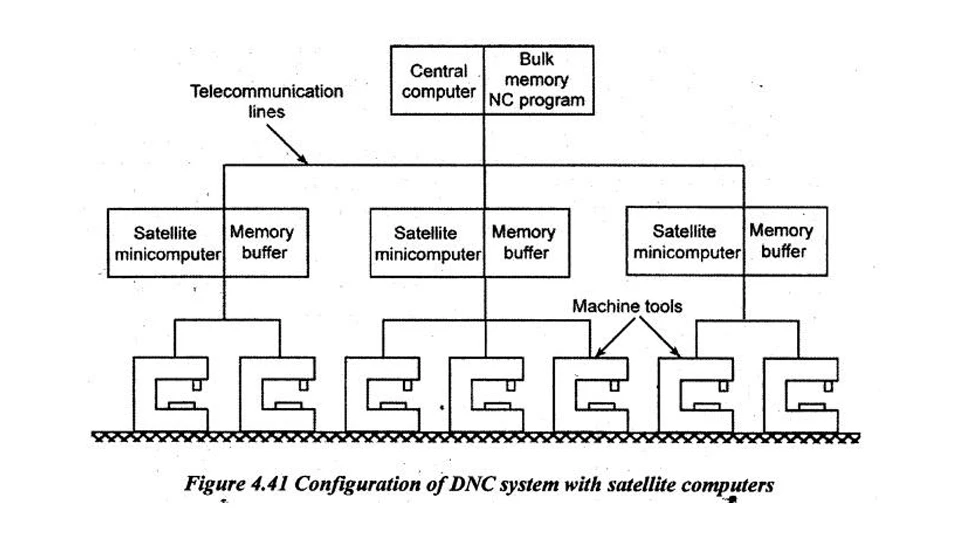
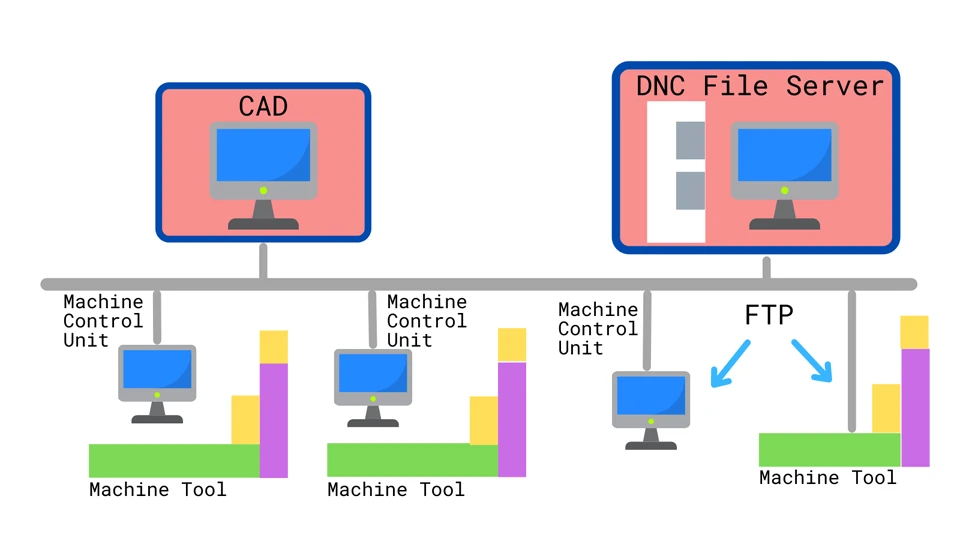
A Direct Numerical Control (DNC) system relies on four key components working together to connect, manage, and control multiple CNC machines through a centralized approach. Each element plays a critical role in ensuring data accuracy, transmission stability, and system scalability on the shop floor.
Central Computer or Server
This is the brain of the DNC system. It stores all NC programs and manages which file gets sent to which CNC machine. Operators interact with this server through terminals or software interfaces, selecting and loading part programs as needed. The central computer often supports user authentication, file version control, and permission settings to avoid accidental overwrites or unauthorized program edits. In larger factories, this server may be integrated with other systems like MES or ERP, though that goes beyond the scope of basic DNC.
Data Communication Network
This is the backbone of DNC—how data moves. Traditional systems use RS232 serial cables to connect the central computer with each CNC machine. However, modern installations often use Ethernet for faster and more stable communication. Signal converters (like USB-to-RS232 or wireless transmitters) are sometimes needed when retrofitting older machines. The choice of network affects speed, stability, and future scalability of the entire DNC setup.
CNC Machines with DNC Capability
Not every CNC machine is plug-and-play with DNC. The machine must support external communication via a serial or Ethernet port. Most modern CNC controllers from brands like Fanuc, Siemens, or Mitsubishi include this functionality. For older machines, small hardware modifications or software upgrades may be necessary. Once connected, the machines receive programs directly from the server, eliminating the need for USB drives, memory cards, or local storage.
DNC Transmission Software
This software acts as the bridge between the central server and each CNC machine. It manages the flow of G-code files, handles communication protocols, and ensures that drip-feeding works properly for machines with limited memory. Common software options in the industry include CIMCO DNC-Max, NCLink, Predator DNC, and others. These tools typically support features like auto-retry, error detection, and transfer logs to ensure program integrity.
Benefits of Using DNC in Manufacturing
Direct Numerical Control (DNC) brings powerful advantages to modern manufacturing environments, especially when managing multiple CNC machines on a single shop floor. Its centralized structure eliminates common inefficiencies associated with manual program handling and scattered data storage. Below are the key advantages of DNC in real-world production settings:
Centralized Program Management
With DNC, all part programs are stored in one location—the central server. Operators no longer need to transfer files using USB drives, memory cards, or local PCs at each machine. This reduces the risk of using outdated or incorrect versions of programs, and ensures consistency across all machines. Updates are made once on the server and immediately available to all authorized users.
Reduced Machine Downtime
Manual file transfers and program loading can lead to unexpected delays. DNC minimizes idle time by allowing operators to instantly call programs from the server as soon as a machine is ready. Some systems also support automated program distribution, where the next job is queued and sent without operator input. Less waiting means higher throughput and faster job turnaround.
Fewer Human Errors
When files are handled manually, there’s always a risk of sending the wrong program, selecting the wrong version, or overwriting important data. DNC systems can assign program permissions by user or machine, reducing the chance of mistakes. Many DNC software platforms also maintain access logs and history tracking, helping quality control teams trace errors if they occur.
Simultaneous Multi-Machine Operation
DNC enables parallel control and file distribution across multiple machines. In a busy production environment, several CNC machines may require different programs simultaneously. The DNC system can send each one the correct program without conflict. This kind of parallel processing improves productivity in high-mix, low-volume production as well as in mass manufacturing lines.
Better Version Control and Traceability
Every change made to a part program is stored and traceable in the DNC system. Revision numbers, timestamps, and user IDs help ensure accountability. If a problem is found in a finished part, managers can quickly identify which version of the program was used, who sent it, and when it was run. This enhances process control, documentation, and customer compliance.
DNC vs CNC: What’s the Difference?
Although Direct Numerical Control (DNC) and Computer Numerical Control (CNC) are closely related, they represent different concepts in how machining operations are controlled. Understanding the distinction between them is essential for factory managers, engineers, and procurement professionals when planning automation upgrades or selecting equipment for their production lines.
CNC: Localized, Independent Machine Control
A CNC machine is a self-contained unit with its own built-in computer and memory. Programs are typically loaded directly onto the machine using USB drives, local networks, or memory cards. Each CNC machine operates independently, meaning there is no central system managing the flow of programs or monitoring multiple machines. While this setup works well for small operations or low production volumes, it quickly becomes inefficient in environments with many machines and frequent program changes.
DNC: Centralized, Multi-Machine Control
DNC is an extension of CNC—it links multiple CNC machines to a single central computer. Instead of storing and loading programs locally, DNC allows operators to request and run part programs from a central server. This system enables centralized program control, uniform version management, and remote file access across all connected machines. DNC doesn’t replace the CNC controller; rather, it enhances the way it receives and manages instructions.
Key Differences at a Glance
| Feature | CNC | DNC |
|---|---|---|
| Control Type | Local | Centralized |
| Program Storage | On individual machine | On central server |
| Number of Machines | One | Many (simultaneous control) |
| File Transfer | Manual (USB, card, etc.) | Network-based (RS232, Ethernet) |
| Version Management | Manual | Centralized, traceable |
| Ideal Use Case | Small shop or stand-alone machines | Multi-machine shop floors, high-volume ops |
Summary
CNC handles the execution of machining programs at the machine level, while DNC handles the distribution and management of those programs across a network of machines. DNC is most useful when scale, consistency, and coordination matter. In essence, CNC does the machining, DNC ensures the right instructions get there at the right time.
DNC Application Scenarios in Industry
Direct Numerical Control (DNC) systems are especially valuable in production environments where multiple CNC machines operate simultaneously and require frequent program changes or large-volume program management. By centralizing how machining programs are delivered and controlled, DNC helps standardize workflows, reduce bottlenecks, and simplify file coordination across the entire shop floor.
High-Mix, Multi-Machine Environments
In facilities that operate a wide variety of CNC machines—each performing different tasks or handling different product variants—DNC plays a crucial role in managing complexity. Operators can quickly request the correct program for each job without manually loading or searching through local folders. This is particularly helpful when switching between part numbers, custom batches, or complex component revisions.
Program Changes and Engineering Updates
Manufacturing sites often face last-minute design changes or corrections to machining code. With DNC, engineers can update a program once on the central server, and it will be instantly available to all relevant machines. This eliminates the delay and confusion of reloading modified files across multiple stations, ensuring that only the latest approved version is used.
Memory-Limited CNC Machines
Older CNC machines with limited onboard memory can’t store large or complex G-code programs. DNC enables these machines to operate efficiently by drip-feeding the program line by line from the central server. This allows them to handle operations they otherwise couldn’t support, extending their functional lifespan without the need for costly upgrades.
Standardized Workflow and Operator Efficiency
With DNC in place, operators follow a consistent procedure to load programs—select, send, and start machining—regardless of machine brand or model. This reduces training time, minimizes errors caused by inconsistent processes, and allows operators to work across different machines with confidence.
Conclusion
Direct Numerical Control (DNC) is not just a technical concept, but a practical solution to real manufacturing challenges. Throughout this article, I explained what DNC is, how a DNC system is structured, what advantages it brings to production, how it differs from standalone CNC operation, where it is commonly applied, and what limitations should be considered before implementation. At its core, DNC solves one fundamental problem: how to manage CNC programs efficiently, accurately, and consistently across multiple machines. By centralizing program storage, reducing manual intervention, and improving coordination on the shop floor, DNC becomes an essential tool for manufacturers aiming to scale operations while maintaining precision and control.
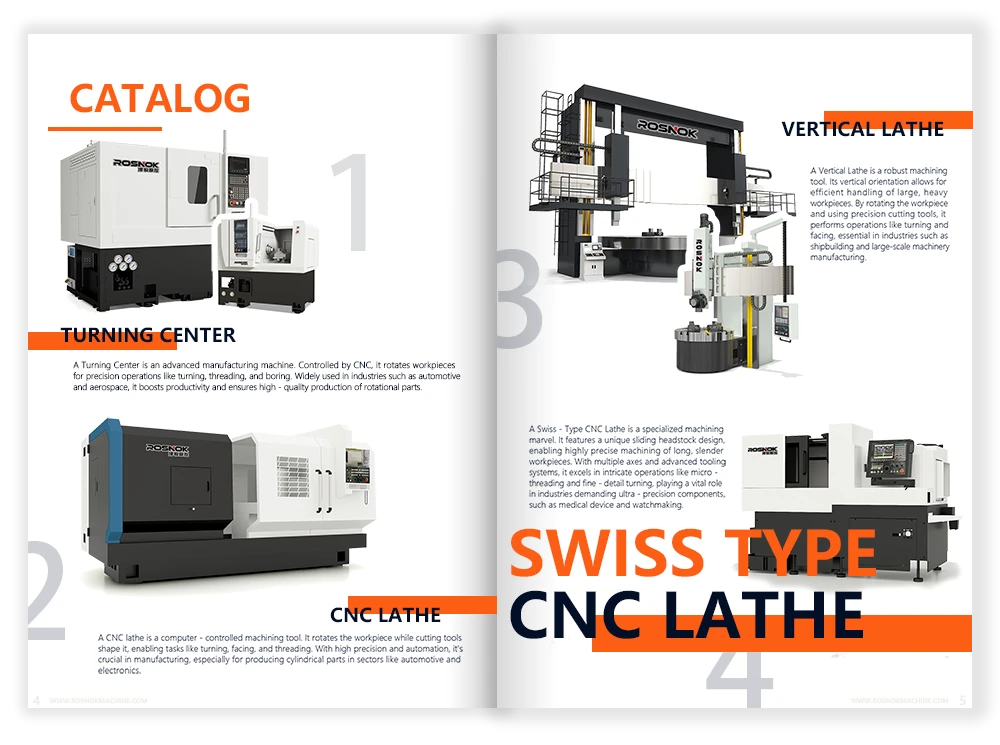
In real production environments, the value of DNC becomes most visible when it is combined with reliable, well-designed CNC machine tools. At Rosnok, we focus on building CNC lathes, machining centers, and precision machine tools that are designed with real factory workflows in mind, including seamless compatibility with DNC systems. Our machines are built to integrate smoothly into centralized control environments, helping manufacturers move toward more efficient, organized, and future-ready production without unnecessary complexity.